![eligo_logo-bicolor-1.png]](https://support.eligo.social/hs-fs/hubfs/eligo_logo-bicolor-1.png?height=38&name=eligo_logo-bicolor-1.png)
1. Verify that the voting module is active in your license
If the module is not active, the automatic opening cannot function. When entering the voting date and time, if the module is not active, the screen will appear as follows: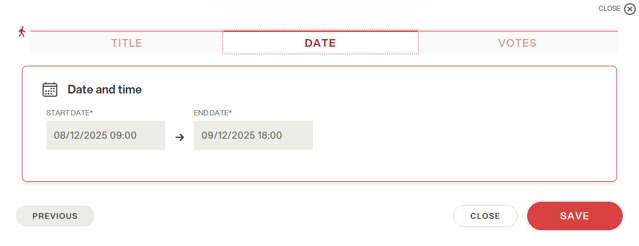
Furthermore, Eligo Light licenses do not include the active voting module, unless explicitly requested during the purchase phase.
If the module is disabled, you need to contact your sales representative for activation.
2. Verify that the automatic opening toggle is active
If your license allows for automatic opening, the system will open the voting automatically only if the toggle is active when setting the start and end times.
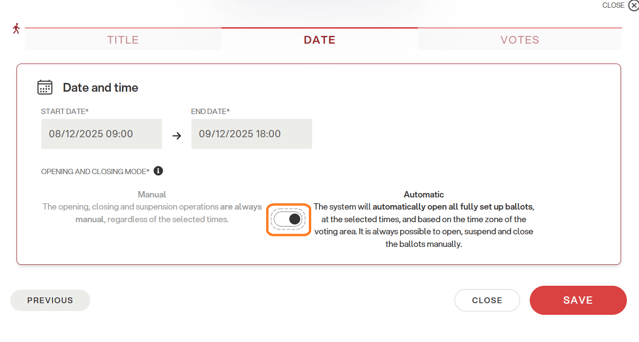
This function can be modified until the credentials are sent. In fact, after the credentials are sent, it is no longer possible to make any changes to the times.
3. Verify that credentials have been sent to voters
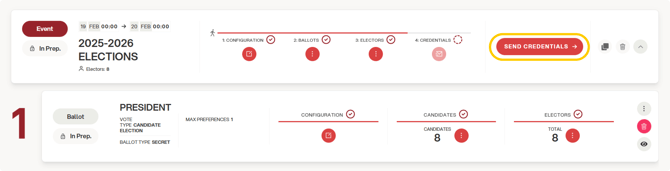
The voting system cannot open automatically if the credentials have not been previously sent to voters.
Sending credentials is a necessary step for the validation of the electoral event.
In order to proceed with the regular opening of the voting process, it is therefore essential to complete the credential sending phase first.
4. Verify that all ballots have been validated
If even one ballot has not been validated, the voting cannot open automatically. This can happen if the new ballot was created after the credentials were sent.
In this case, click "send credentials" next to the newly created ballot to validate it before the automatic opening time of the electoral event.
5. Verify that there is at least one candidate on each ballot
If all candidates have been removed from a ballot before opening, the system cannot proceed with the automatic opening of the voting, as it does not recognize that all the steps required to start the voting have been completed.
It is therefore necessary to check that every ballot in the event contains at least one candidate before the scheduled opening time.