![eligo_logo-bicolor-1.png]](https://support.eligo.social/hs-fs/hubfs/eligo_logo-bicolor-1.png?height=38&name=eligo_logo-bicolor-1.png)
After completing the configuration of an assembly event, the final step before opening it is validation.
This step is extremely important, as it allows you to definitively confirm all the configurations and settings that have been entered.
⚠️ After validation, it will no longer be possible to change the start date, nor to add, remove, or modify the videoconference link.
What to do before validating an event
Once an event has been validated, it will no longer be possible to modify the event configurations, upload voters in bulk, or remove them. Therefore, there are some preliminary checks that help ensure the correct execution of the voting process:
-
Send credentials at least 24 hours in advance, to allow all participants to receive the email in time before voting opens;
-
Check that all email addresses have been entered and are correct, to ensure that all eligible voters receive their credentials;
-
Carefully review all configurations and settings, especially those related to the event (event name, date, and time), as these details will be included in the email sent to voters and cannot be modified afterwards.
At this point, the event is ready and you can proceed to the next step.
Sending credentials
To validate the event, simply click on the “Send credentials” button.
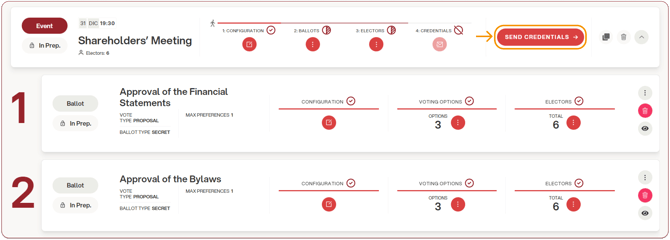
A confirmation screen will appear.
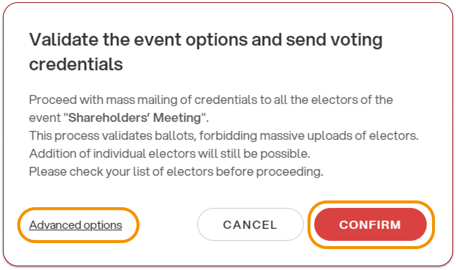
By clicking the “Confirm” button on the right, credentials (or a direct access link, depending on your voting area settings) will be sent.
Voters will then receive the email allowing them to access the voting area.
By clicking “Advanced options”, a screen will open that allows you to customize the event validation and/or the sending of credentials according to your needs, as explained here.