![eligo_logo-bicolor-1.png]](https://support.eligo.social/hs-fs/hubfs/eligo_logo-bicolor-1.png?height=38&name=eligo_logo-bicolor-1.png)
Some regulations require that there might not be a defined list of candidates to display, but that anyone who belongs to a certain category or is an associate can be elected.
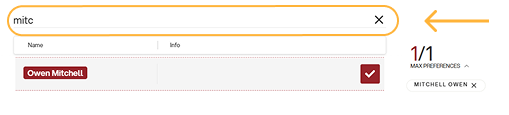
In this case, Eligo allows you to enter all eligible voters without them being displayed in the candidate list, but they can be searched for and voted for using a specific search bar.
Configuration of the list of eligible voters
Fill out the candidate Excel file by entering all the required data. Under the field "Formal Candidate", enter 1 if the candidate should be visible in the list and 0 for non-visible eligible voters.
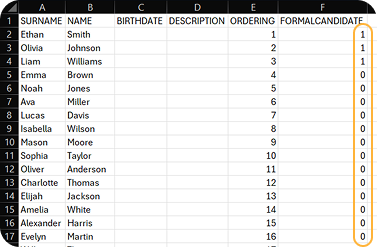
Depending on what the regulation stipulates, it is also possible to include all non-visible eligible voters. In this case, the value 0 will be assigned to everyone in the "Formal Candidate" column.
Proceed with uploading the file to the corresponding ballot.
Selection of eligible voters on the voter side
Upon access, the voter will see the ballot clearly displaying the official candidates and a search bar from which to select the eligible voters:
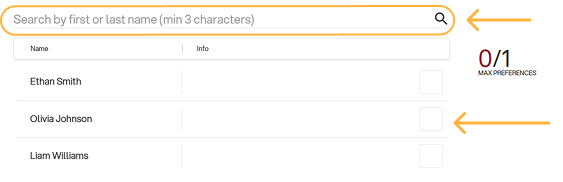
By entering at least 3 characters of the name or surname of one of the eligible voters in the bar, the voter will be able to view those whose name contains those characters and select a preference.